AP Paddy Procurement Login 2026: Your Complete Guide to www.paddyprocurement.ap.gov.in & WhatsApp Booking

⚠️ Quick Alert for AP Paddy Procurement 2026: The AP Civil Supplies Department has introduced a new WhatsApp Chatbot and enhanced its official ap paddy procurement portal to eliminate long waiting times at Rice Mills and RBKs. You can now book your slot from home, register online, track your paddy procurement status, and get payment within 48 hours.
The days of waiting for days with your tractor at the Rythu Bharosa Kendra (RBK) or Paddy Procurement Centre (PPC) are over. For the Kharif & Rabi 2026-27 season, the Andhra Pradesh government has launched a revolutionary comprehensive system, integrating the official paddyprocurement.ap.gov.in portal with an “AI-Voice Guided” WhatsApp Booking System under the Ease of Doing Farmer Service initiative.
If you are a farmer in East Godavari, West Godavari, Krishna, Guntur, Eluru, or any other district, this definitive guide will show you exactly how to navigate the ap paddy procurement portal for online registration, login, status checks, and how to use the WhatsApp number 73373-59375 to sell your crop for AP Paddy Procurement 2026. The primary focus remains on efficient access through the www paddy procurement ap gov in login system.
AP Paddy Procurement Portal 2026: Your Official Online Hub
The Andhra Pradesh government has centralized its paddy procurement process through the dedicated online platform: paddyprocurement.ap.gov.in. This portal is the primary hub for farmers to manage their paddy sales, ensuring transparency, efficiency, and direct benefit transfer (DBT). Essential for any farmer, understanding the www paddy procurement ap gov in login process is key to leveraging this system.
Key Features of the AP Paddy Procurement Portal:
- Online Farmer Registration: New farmers can register their details quickly.
- Paddy Stock Entry & Booking: Submit details of your harvest and book procurement slots.
- Tracking Procurement Status: Keep an eye on the progress of your paddy sale, from quality check to delivery.
- Checking Payment Status: Verify if your payment has been processed and credited to your bank account.
- Access to Procurement Policies & MSP: Stay informed about the latest Minimum Support Price (MSP) and scheme guidelines for AP Paddy Procurement 2026.
Whether you’re selling your produce for the Kharif or Rabi 2026-27 season, understanding this ap paddy procurement portal and its AP Paddy Procurement Login mechanism is essential for a smooth and efficient transaction.
AP Paddy Procurement 2026 Online Registration Guide
Before you can sell your paddy, new farmers must register on the official ap paddy procurement portal. This ensures your details are linked to your e-Crop data and bank account for direct benefit transfer (DBT). Here’s a step-by-step guide:
Prerequisites for Registration:
- Valid Aadhaar Number
- Active Mobile Number (preferably linked to Aadhaar for OTP verification)
- Bank Account Details (Account Number and IFSC code)
- e-Crop Registration (mandatory for verification of cultivated crop)
- CCRC Card (for tenant farmers, if applicable for 2026-27)
Step-by-Step Online Registration:
- Visit the Official Portal: Go to paddyprocurement.ap.gov.in.
- Click on ‘New Farmer Registration’: Look for a prominent button or link typically labeled “New Farmer Registration” or “Rythu Nondani”.
- Enter Aadhaar & Mobile: Input your 12-digit Aadhaar number and your registered mobile number carefully.
- Verify with OTP: An OTP (One-Time Password) will be sent to your mobile. Enter it in the designated field to proceed to the next step.
- Fill in Farmer Details: Provide personal details, land information (as per e-Crop data), and bank account particulars accurately. The system will cross-verify with existing databases, especially your e-Crop (e-Karshak) registration.
- Upload Documents (if required): Some sections might ask for scanned copies of your Aadhaar card, bank passbook front page, or CCRC card. Ensure these are clear and legible.
- Review and Submit Application: Carefully review all the entered information for any errors. Once confirmed, click on “Submit” to complete your registration. You will receive a unique registration ID.
Keep your registration ID safe for future reference and for checking your application status. Once registered, you are ready to use the www paddy procurement ap gov in login to manage your AP Paddy Procurement 2026 activities.
How to Login to www paddy procurement ap gov in login: Farmers & Millers Guide
The www paddy procurement ap gov in login portal serves as the central access point for both farmers and rice millers to manage their respective activities within the AP Paddy Procurement system. Accessing your dashboard is crucial for smooth transactions and real-time updates.
Farmer Login Process:
Once registered, farmers can easily log in to the paddyprocurement.ap.gov.in login portal to manage their procurement activities, check current status, and verify payments. Follow these simple steps:
- Navigate to the Portal: Open your web browser and go to paddyprocurement.ap.gov.in.
- Click ‘Farmer Login’: Locate the ‘Farmer Login’ or ‘Rythu Login’ option on the homepage.
- Enter Credentials: You will typically need to enter your Aadhaar Number or a User ID (generated during registration) along with your registered Mobile Number.
- OTP Verification: A One-Time Password (OTP) will be sent to your registered mobile number for secure login. Enter this OTP to proceed.
- Access Dashboard: Upon successful verification, you will be redirected to your personalized farmer dashboard.
From your dashboard, you can view your e-Crop details, upcoming slot bookings, previous procurement history, and most importantly, perform a paddy procurement status check ap and verify your payment details.
Miller Login Process:
Rice millers, integral to the paddy procurement chain, also have a dedicated section on the paddyprocurement.ap.gov.in login portal. Their login enables them to confirm paddy receipts, manage milling operations, and ensure timely processing. While specific steps may vary slightly, the general process is as follows:
- Visit the Portal: Go to paddyprocurement.ap.gov.in.
- Locate ‘Miller Login’: Find the ‘Miller Login’ or ‘Millers’ section on the homepage, usually separate from the farmer login.
- Enter Credentials: Input your registered Miller ID (provided by the Civil Supplies Department) and your password. This may also involve an OTP verification to a registered mobile number.
- Access Miller Dashboard: After successful authentication, millers can access their dashboard to view allocated paddy, confirm receipts from RBKs, manage stock, and track payment processing for their services.
Ensuring both farmers and millers can easily use the www paddy procurement ap gov in login system streamlines the entire procurement and supply chain in Andhra Pradesh.
Paddy Procurement Status Check AP & Payment Verification 2026
One of the most crucial features of the ap paddy procurement portal is the ability to track the status of your paddy sale and verify your payment efficiently. Here’s how you can perform a paddy procurement status check ap:
How to Check Paddy Procurement Status Online:
- Log In to Your Dashboard: Follow the steps above to use the www paddy procurement ap gov in login and access your farmer account on paddyprocurement.ap.gov.in.
- Navigate to ‘My Applications/Procurement Status’: On your dashboard, look for a section like “My Paddy Sales,” “Procurement Status,” “Application Status,” or “Payment Status.”
- View Details: Here, you will see a list of your bookings and their current status – whether it’s ‘Booked,’ ‘Paddy Delivered,’ ‘Quality Check Pending,’ ‘Payment Processed,’ or ‘Payment Credited.’
- Use Application/Coupon ID: Sometimes, you can also check status directly on the portal without logging in by entering your Aadhaar number, Application ID, or the WhatsApp Coupon Code received during booking.
Verifying Your AP Paddy Procurement Payment:
The AP Civil Supplies Department aims for a 48-hour payment guarantee for paddy procured. To verify your payment status for AP Paddy Procurement 2026:
- Check Dashboard: On your farmer dashboard, navigate to the “Payment Status” section. It will display the transaction ID, date of payment, and credited amount.
- Bank Account Alerts: Ensure your registered mobile number receives SMS alerts for bank transactions.
- Bank Passbook/Statement: Regularly check your bank passbook or online statement for the credited amount from the AP Civil Supplies Corporation. The payment will reflect as a Direct Benefit Transfer (DBT). For related government benefits and their status, you can also check your Rythu Bharosa Status Check by Aadhaar.
- Toll-Free Helpline: If payment is delayed beyond the 48-hour guarantee, do not hesitate to use the troubleshooting helplines provided below.
This comprehensive online system, accessible via the AP Paddy Procurement Login, provides transparency, allowing farmers to monitor their transactions from booking to payment, reducing the need for manual inquiries for their AP Paddy Procurement 2026.
The Magic Number: AP Paddy Procurement WhatsApp Booking (73373-59375)
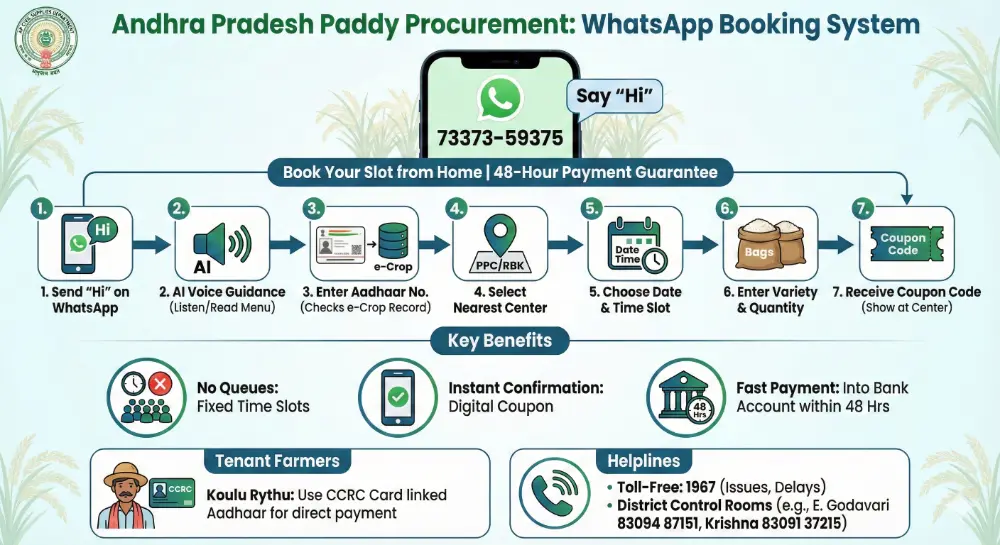
While the ap paddy procurement portal offers comprehensive management, the WhatsApp booking system remains a highly convenient alternative for slot booking. Save this number on your phone immediately: 73373-59375. This is the official helpline and booking bot for the AP Civil Supplies Corporation. It works 24/7 and talks to you in Telugu and English, making AP Paddy Procurement 2026 accessible to all. Farmers who prefer a simpler, direct method can utilize this, though the portal provides more detailed tracking after using the www paddy procurement ap gov in login.
Why Use WhatsApp Booking for AP Paddy Procurement 2026?
- No Queues: You get a specific “Time Slot” (e.g., 10:00 AM to 12:00 PM). Go only at that designated time to the RBK or PPC.
- Instant Confirmation: You receive a digital Coupon Code immediately after successful booking.
- 48-Hour Payment Priority: Farmers who book via WhatsApp are often prioritized for the “48-hour payment guarantee” directly into their registered bank accounts, aligning with the efficiency of the ap paddy procurement portal.
Step-by-Step: How to Book a Slot for AP Paddy Procurement 2026 on WhatsApp
Follow these exact steps to book your slot for AP Paddy Procurement 2026 in less than 2 minutes using WhatsApp:
Step 1: Say “Hi” Open WhatsApp and send the message “Hi” to 73373-59375.
Step 2: AI Voice Guidance You will receive a greeting message. For the first time, the bot uses Artificial Intelligence (AI) Voice to guide you. Listen to the instructions or read the menu options carefully.
Step 3: Enter Aadhaar Number The bot will ask for your 12-digit Aadhaar Number. Type it carefully.
- Note: The system checks this number against the e-Crop (e-Karshak) database. If your crop is not registered in e-Crop, the bot will say “No Record Found.” (Contact your VAA immediately if this happens and ensure your details are updated on the ap paddy procurement portal).
Step 4: Select Your Center (PPC) The bot will show you the paddy procurement centers (RBKs or Mills) mapped to your village based on your e-Crop registration. Select the one nearest to you for your AP Paddy Procurement 2026.
Step 5: Choose Date & Time The system will show you 3 available dates for procurement slots.
- Select a convenient date (e.g., Jan 4, 2026).
- Select an available time slot (Morning or Afternoon).
Step 6: Enter Quantity
- Select your Paddy Variety (Common / Grade A).
- Enter the Number of Bags (Gunny Bags) you want to sell.
Step 7: Get Coupon Code Success! The bot will send you a Coupon Code (e.g., PPC-2026-898). Show this code to the Technical Assistant at the center to get instant entry and proceed with your AP Paddy Procurement 2026.
For Tenant Farmers (CCRC Card Holders) in AP Paddy Procurement 2026
If you are a tenant farmer (Koulu Rythu) in Andhra Pradesh, can you use the ap paddy procurement portal and WhatsApp booking system? Yes, absolutely.
- Requirement: You must have a valid CCRC (Crop Cultivator Rights Card) for the 2026-27 season. Ensure this card is active and linked to your e-Crop registration.
- The Trick: When you enter your Aadhaar number in WhatsApp or register on the www paddy procurement ap gov in login portal, the system automatically checks the CCRC database. If your card is active and linked to e-Crop, the payment for your AP Paddy Procurement 2026 will come directly to your bank account, not the land owner’s.
Troubleshooting & Helplines for AP Paddy Procurement 2026
Is the bot not working? Facing issues with the ap paddy procurement portal login or payment? Here is your backup plan for AP Paddy Procurement 2026.
1. Toll-Free Grievance Number: 1967
Call 1967 for any issues related to:
- Gunny Bag Shortage or quality issues.
- Miller not accepting your paddy stock despite a valid booking.
- Payment delay beyond the guaranteed 48 hours – use this for paddy procurement status check ap payment issues.
- Problems with online registration or accessing the www paddy procurement ap gov in login.
2. District Control Room Numbers (2026)
If the local staff or RBK coordinator is not cooperating, or if your issue isn’t resolved via the toll-free number, call your District Control Room directly for AP Paddy Procurement 2026 support:
| District | Control Room Number |
| East Godavari | 83094 87151 |
| West Godavari | 81216 76653 |
| Krishna | 83091 37215 |
| Guntur | 94913 92717 |
| Eluru | 77020 03584 |
| NTR District | 77020 03571 |