AP e-Crop Status Check by Aadhar Card 2026: Your Complete Guide

For lakhs of Andhra Pradesh farmers, knowing your e Crop (eKarshak) booking status is paramount to accessing vital government support and benefits. The most reliable and widely used method for this is to check your `e crop status by aadhar card`. An accurate and approved e-Crop booking, verified via your Aadhar, decides everything:
- Whether your crop is officially recorded and verified by the state.
- Whether you receive the crucial Rythu Bharosa financial assistance.
- Whether you are eligible for comprehensive crop insurance under PMFBY (Pradhan Mantri Fasal Bima Yojana).
- Whether you get timely input subsidy and compensation during unforeseen natural calamities like droughts or floods.
If you’ve booked your crop but are unsure whether your application is Approved, Pending, or Rejected, this comprehensive guide is designed to help you perform an `AP e-Crop Status Check` quickly, clearly, and without confusion for the year 2026. For a seamless experience with all e-Panta related services, including checking your status, you may also utilize the official e Panta Login. We’ll walk you through the precise steps to check your `e crop status by aadhar card` online, understand various statuses, troubleshoot common issues, and even download your official e-Crop certificate.
What is AP e-Crop Status? Understanding Your Aadhar-Linked Booking Verification
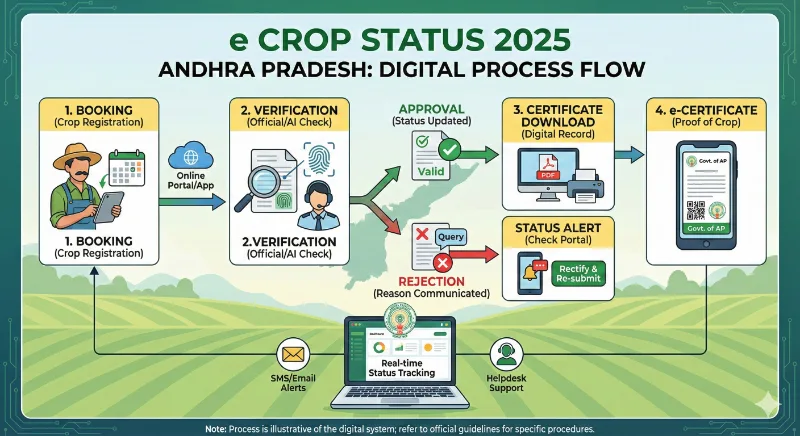
Your `AP e-Crop Status Check`, often performed using your Aadhar card, provides a definitive update on whether the Revenue Department and agricultural field officers have successfully verified your crop booking. This verification is crucial as it links your cultivation details to your identity and land records, ensuring transparency and eligibility for government schemes. The status can display one of three outcomes:
- Approved – This is the desired outcome, indicating your crop booking has been successfully verified and accepted by the authorities.
- Pending – This means your application is still under review. Verification by the Village Agriculture Assistant (VAA) or other officials is ongoing or awaiting completion.
- Rejected – Your crop booking has been denied. This usually occurs due to discrepancies, incorrect information, or failure to meet specific criteria.
Understanding your e-Crop status is fundamental because it directly impacts your access to various critical government support mechanisms, including:
- Rythu Bharosa payment installments, vital for farmer livelihood.
- Successful processing of your Crop Insurance claim under schemes like PMFBY.
- Eligibility for compensation during natural disasters such as drought or flood.
- Consideration for loan waiver programs announced by the state government.
- Accuracy of the official crop survey data maintained by the agriculture department, which informs policy decisions.
For more detailed information on the booking process, you can refer to our E Panta Login Guide.
How to Check Your `e Crop Status by Aadhar Card` (AP) Step-by-Step Online?
Performing your `e crop status by aadhar card` check for 2026 is a straightforward process. Follow these simple steps to view your booking status online:
Step 1: Visit the Official eCROP Portal
Open your web browser and navigate to the official Andhra Pradesh eCROP portal: https://karshak.ap.gov.in/eCROP/
Step 2: Locate and Click on “e Crop Status”
On the homepage, look for the option labeled “e Crop Status” or “Check Your e-Crop Status” and click on it. This link is typically prominent and easy to find.
Step 3: Enter Your Aadhaar Number
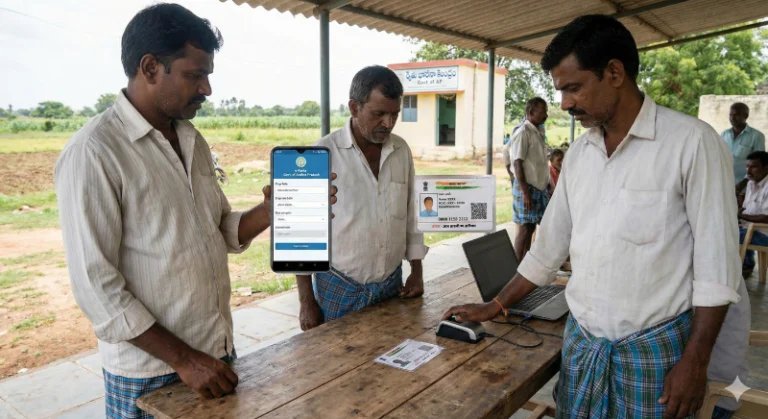
You will be prompted to enter your 12-digit Aadhaar number to perform your `e crop status by aadhar card` check. While other options like Survey Number might be available, using your Aadhaar number is the most direct and recommended method.
Step 4: Submit and View Your Status
After entering your Aadhaar number, click on the “Submit” or “View Status” button. Your e-Crop booking details will be displayed instantly. You will typically see comprehensive information, including:
- Farmer Name (as per records linked to Aadhar)
- Booking Season (e.g., Kharif 2026 / Rabi 2026-27)
- Crop Name (e.g., Paddy, Maize, Groundnut)
- Extent (Total area in Acres/Hectares for the booked crop)
- Survey No. (The specific land survey number)
- Booking Date (When the crop was officially booked)
- Current Status: Approved / Pending / Rejected
AP e-Crop Status: Approved – What It Means for You
If your `AP e-Crop Status Check` (often performed via Aadhar) shows **APPROVED**, congratulations! This signifies that your crop booking details have been thoroughly verified by the Village Agriculture Assistant (VAA) and the Revenue Department, aligning with the actual crop cultivated on your land. An “Approved” status confirms your official recognition as a farmer cultivating the specified crop in the given season. You are now formally eligible for a range of critical benefits and government support:
- The full Rythu Bharosa payment of ₹7,500 (or as per the latest scheme guidelines).
- Coverage under PMFBY crop insurance, providing financial protection against crop losses.
- Eligibility for calamity relief and compensation in the event of natural disasters affecting your crops.
- Access to various agricultural subsidies on seeds, fertilizers, and equipment.
- Streamlined access to agricultural bank loans based on verified crop data.
With an Approved status, verified through your Aadhar, you can proceed to download your official e-Crop Certificate, which serves as crucial proof of cultivation.
AP e-Crop Status: Pending – Why Your Aadhar-Linked Application May Be Delayed
If your `e crop status by aadhar card` check shows **PENDING**, it means your application is still in the verification queue. While this can be a temporary state, it’s important to understand the common reasons behind it:
- Village Agriculture Assistant (VAA) Verification Pending: The VAA is responsible for physical verification of crops on the ground. A delay might occur if the VAA has not yet visited your field or processed the report.
- Drone/GPS Crop Verification Not Completed: The AP government extensively uses modern technology like drones and GPS mapping for accurate crop identification. If this technological verification is still underway, your status might remain pending.
- Wrong Survey Number Under Verification Queue: Sometimes, minor errors in the survey number might push the application into a manual verification queue, causing delays.
- High Volume of Bookings: During peak booking seasons, the sheer volume of applications can lead to delays in processing and verification.
- Technical Glitches: Occasionally, system or network issues can temporarily halt processing.
Tip: A “Pending” status is quite normal, especially during the first 30-45 days after the crop booking deadline. However, if it persists beyond this period, it’s advisable to contact your local Village Secretariat or VAA for an update.
AP e-Crop Status: Rejected – Common Reasons and What to Do
A “Rejected” status on your `AP e-Crop Status Check` can be disheartening, as it implies a barrier to receiving benefits. However, understanding the main reasons for rejection can help you take corrective action. These are the most common rejection reasons observed in Andhra Pradesh:
- Wrong Survey Number: The survey number entered in the booking form does not match the official land records or the actual land cultivated.
- Different Crop Actually Grown: The crop specified in the e-Crop booking does not match the crop physically observed during verification.
- Name Mismatch (Aadhaar + Webland/Bank): Discrepancies in the farmer’s name between their Aadhaar card, land records (Webland), or bank account details. This is a common reason for `e crop status by aadhar card` rejection.
- Incorrect Acreage Entry: The area (extent) of cultivation mentioned in the booking is inaccurate compared to field measurements.
- Tenant Farmer Details Missing/Incorrect: If you are a tenant farmer, the details of the landowner or the lease agreement might be incomplete or incorrect.
- Duplicate Booking: Submitting multiple e-Crop bookings for the same land parcel or crop within the same season.
- eKYC Not Done/Failed: Failure to complete the mandatory eKYC (Electronic Know Your Customer) process, often linked to Aadhaar.
- No Crop Found: During physical verification, no crop was found on the specified land.
Solution: Don’t panic! Most rejection issues can be resolved. See the next section for immediate actionable steps.
How to Fix AP e-Crop Status Rejection Issues (Aadhar & Other Methods)?
Addressing e-Crop rejection promptly is crucial. Here’s how to resolve common issues:
✔ Wrong Survey Number or Incorrect Acreage
Action: Immediately visit your Village Secretariat or Rythu Bharosa Kendra (RBK) with your land documents (Patta Passbook, Adangal) and Aadhaar. Request a correction in the e-Crop system. The VAA or Panchayat Secretary will guide you on rectifying the land details.
✔ Incorrect Crop Chosen / Different Crop Actually Grown
Action: Contact your Village Agriculture Assistant (VAA) directly. Explain the discrepancy and request them to conduct a fresh field visit to verify the correct crop and update the e-Crop entry accordingly. Provide any supporting evidence like seed bills if available.
✔ Name Mismatch (Aadhaar, Webland, Bank)
Action: Ensure that your name is consistent across all official documents – Aadhaar, land records (Webland), and your bank account. If there’s a mismatch, prioritize updating your Aadhaar name at an Aadhaar enrollment center or your bank details at the respective branch to reflect the correct, uniform name. This is vital for all DBT (Direct Benefit Transfer) schemes and for a successful `e crop status by aadhar card` verification.
✔ eKYC Pending or Failed
Action: Complete your eKYC as soon as possible. You can do this through the official PM-Kisan portal: https://pmkisan.gov.in → eKYC option. Alternatively, visit your nearest Common Service Center (CSC) or Rythu Bharosa Kendra (RBK) for assistance with Aadhaar-based eKYC. Without eKYC, approvals are impossible, and benefits will be withheld.
✔ Tenant Farmer Details Issue
Action: Provide complete and accurate lease details, including the landowner’s Aadhaar and a copy of the lease agreement, to your VAA or at the Village Secretariat. Ensure proper documentation of the tenant-landlord relationship is on record.
Always keep copies of all submitted documents and note down the names of officials you interact with for future reference.
How to Download Your AP e-Crop Certificate by Aadhar Card (PDF) 2026?
Once your `e crop status by aadhar card` check shows “Approved,” you can proceed to download your digital e-Crop Certificate. This certificate is a crucial document and serves as official proof of your crop cultivation for various purposes:
- Facilitating your crop insurance claim process.
- Availing government subsidies and financial aid.
- Applying for agricultural loans from banks and financial institutions.
- Providing legal proof of cultivation for tenancy or land-related disputes.
Steps to Download:
- Visit the official eCROP Portal: https://karshak.ap.gov.in/eCROP/
- Navigate to the Reports section. Look for options such as “Booking Report̶D; or “Certificate Download̶D;.
- Enter your 12-digit Aadhaar number in the designated field. This is how you retrieve your Aadhar-linked certificate.
- Click “Submit” or “Generate Report” and then proceed to Download your e-Crop Certificate in PDF format.
It’s recommended to print a physical copy for your records and keep a digital backup.
e Crop Booking Last Date 2026 (AP)
To avoid any issues with your `AP e-Crop Status Check`, especially when verifying via Aadhaar, ensure your crop booking is completed within the stipulated deadlines for each agricultural season. For 2026, the approximate booking periods are:
- Kharif 2026: Typically runs from June to July.
- Rabi 2026–27: Usually from November to December.
(Please note: These are general timelines. Always refer to the latest official notifications from the Andhra Pradesh Department of Agriculture for exact dates, as they may slightly vary each year based on climatic conditions and policy decisions.) You can see our e crop booking guide for further details.
Documents Needed for `e Crop Status by Aadhar Card` Check
To successfully perform your `e crop status by aadhar card` check and access your details, you will primarily need:
- Your Aadhaar Card (for the Aadhaar number)
- Your land’s Survey Number (as an alternative, but Aadhar is preferred for direct farmer identification)
- Your unique Crop Booking ID (if you have it handy from the booking process)
Having your Aadhaar number ready will ensure a quick and smooth status retrieval.
Why `e Crop Status by Aadhar Card` is Crucially Important in 2026?
The significance of maintaining an accurate and approved `e crop status by aadhar card` has grown exponentially. In 2026, the Andhra Pradesh Government is leveraging advanced technology to streamline agricultural governance and ensure that benefits reach genuine farmers with maximum transparency and minimal leakage. This means:
- AI-Based Verification: Artificial Intelligence algorithms are being used to cross-reference crop bookings with satellite imagery and historical data. Your Aadhaar details are central to this robust and precise verification process.
- Drone Mapping & Geo-tagging: Widespread drone surveys and GPS geo-tagging confirm crop presence and area, with Aadhar-linked data providing the farmer’s identity, significantly reducing manual errors and fraudulent claims.
- Blockchain & DBT Integration: The e-Crop system is increasingly integrated with blockchain technology for immutable records and Direct Benefit Transfer (DBT) mechanisms, ensuring payments are disbursed directly and securely to verified farmers whose Aadhar is linked.
Given these technological advancements, any mismatch, error, or pending status in your Aadhar-linked e-Crop booking can immediately affect your eligibility for critical government schemes and financial aid. Regularly performing an `e crop status by aadhar card` check is no longer just a recommendation but a vital practice for every farmer in Andhra Pradesh.