AP e-Panta Status Check 2026: Verify Crop Booking by Aadhaar & Fix Errors Instantly!

For lakhs of farmers in Andhra Pradesh, understanding their e Panta status is not just a formality—it’s the gateway to critical agricultural support. From essential crop benefits and input subsidies to comprehensive crop insurance (PMFBY) and timely Rythu Bharosa payments, everything hinges on your e-Panta crop booking approval. Yet, many hardworking farmers frequently encounter frustrating errors like “Pending”, “Not Verified”, “No Crop Found”, or “Land Mismatch”, particularly during the crucial Kharif and Rabi seasons. These delays can jeopardize livelihoods and access to vital government schemes.
This comprehensive guide is your ultimate resource, offering clear, simple, and fully updated (2026) instructions to efficiently check your e-Panta status check AP using your Aadhaar number. We’ll also provide actionable steps to quickly fix common issues, ensuring your e panta booking gets approved without unnecessary delays. Stay informed and secure your rightful benefits!
What Exactly Is e-Panta Status for AP Farmers in 2026?
The e-Panta portal is a cornerstone initiative by the Government of Andhra Pradesh to digitalize and streamline crop booking and verification processes. When you book your crop on the official e Panta portal (epanta.ap.gov.in), your crucial crop details, land information, and farmer identity undergo a rigorous multi-stage verification process to ensure accuracy and prevent discrepancies. This process is essential for linking your cultivation details to various state and central government welfare schemes.
Your e Panta status serves as a real-time indicator of where your application stands within this comprehensive verification pipeline. It reflects the outcome of checks performed through:
- Webland land data integration: Comparing your submitted land details with official Webland records to confirm ownership and survey numbers.
- Village Agriculture Assistant (VAA) verification: Field-level physical inspection and confirmation by the VAA to ensure the crop grown matches the booking.
- Satellite/digital crop inspection: Leveraging advanced technology, including satellite imagery and drone surveys (as of 2026), for remote and efficient verification of crop types and areas.
- Rythu Bharosa eligibility checks: Cross-referencing your farmer details with eligibility criteria for the Rythu Bharosa scheme and other linked benefits.
Understanding each possible e Panta status is vital for farmers. Here’s a detailed breakdown of what you might see and what it implies for your e-Panta crop booking:
| Status | Meaning & Implication |
|---|---|
| Approved | Your crop booking has been successfully verified and accepted. This means you are eligible for all linked benefits including Rythu Bharosa, PMFBY, and input subsidies for the booked crop. You can proceed to download your e-Panta crop certificate. |
| Pending VA Verification | The Village Agriculture Assistant (VAA) has not yet completed the field verification of your crop. This is a crucial step that needs to be expedited. |
| Pending MAO Approval | Your application has passed VAA verification but is awaiting final approval from the Mandal Agriculture Officer (MAO). This is the last administrative check. |
| Rejected | Your crop booking has been declined. Common reasons include significant land mismatch (e.g., incorrect survey number in Webland), submission of wrong crop details, or issues with Aadhaar-bank linkage (eKYC, seeding problems). Immediate action is required. |
| No Crop Found | This status indicates that either your crop was not booked properly on the e-Panta portal, the booking process failed midway, or the VAA did not forward the booking correctly. You may need to rebook. |
| eKYC Pending | Your Aadhaar verification (eKYC) is incomplete. Without successful eKYC, you will not be able to receive benefits, as it’s a mandatory step for confirming your identity and linking to DBT (Direct Benefit Transfer). |
For a comprehensive overview of the portal and its features, you can check our full E Panta Guide here.
How to Check e-Panta Status (2026) by Aadhaar: A Step-by-Step Guide
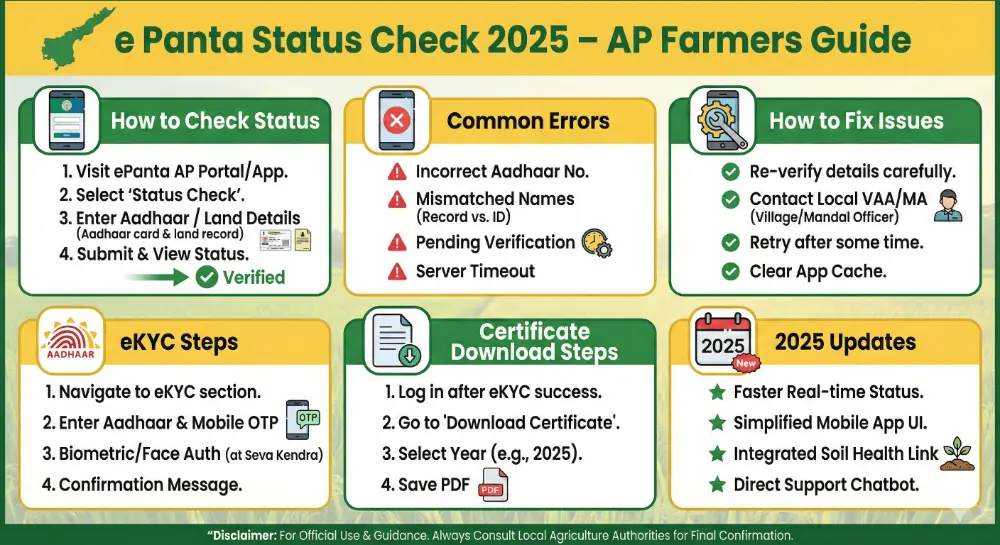
Checking your e-Panta status by Aadhaar is a straightforward process, designed for quick access for all Andhra Pradesh farmers. Whether you’re using a mobile phone or a computer, the steps remain the same. Ensure you have your Aadhaar number handy. You can also refer to our e panta login guide here for more login-specific details.
Step 1: Visit the Official e-Panta Portal
Open your web browser (Google Chrome, Firefox, etc.) and navigate to the official Andhra Pradesh e-Panta portal. Always ensure you are on the legitimate website to protect your data:
Go to: https://epanta.ap.gov.in
Step 2: Locate and Click “Crop Booking Status”
Once on the homepage, look for the “Farmer Services” section. Within this section, you will prominently find the “Crop Booking Status” option. Click on it to proceed. Further information about eCrop booking status here.
Step 3: Enter Your Aadhaar Number or Crop Booking ID
The system will prompt you to enter either your 12-digit Aadhaar Number or the unique Crop Booking ID (if you have one). Entering your Aadhaar number is the most common and recommended method for a direct e-Panta status check by Aadhaar, as it’s linked to all your farming records.
Step 4: Verify with OTP (One-Time Password)
After entering your Aadhaar number, an OTP will be sent to the mobile number linked with your Aadhaar. Enter this OTP into the designated field to verify your identity. This is a crucial security step to ensure only authorized individuals can access the data. Make sure your Aadhaar-linked mobile number is active and accessible.
Step 5: View Your Detailed e-Panta Status
Upon successful OTP verification, your complete e-Panta crop booking status will be displayed. You will see detailed information pertaining to your application, which typically includes:
- The specific Crop you have booked
- The declared cultivation Area
- Your associated Survey number (and sub-division)
- The current stage of Verification stages (e.g., Pending VA, Pending MAO)
- The Final approval or rejection status with reasons if applicable
- A Download Certificate option (if your status is “Approved”)
Review all details carefully to ensure accuracy and to understand the next steps, especially if your status is not “Approved.”
How to Download e-Panta Crop Certificate (2026) for Approved Bookings
Once your e-Panta status check AP shows “Approved,” you are eligible to download your official e-Panta Crop Certificate. This document is crucial for availing various government schemes and benefits. Follow these simple steps:
- Access the Portal: Login to epanta.ap.gov.in using your Aadhaar and OTP, as shown in the status check process.
- Navigate to Status: Once logged in, go to the “Crop Booking” section, and then click on “Status.”
- Download Certificate: If your booking status is “Approved,” you will see a “Download Certificate (PDF)” option next to your crop details. Click on this button to save the certificate to your device.
This downloadable e-Panta certificate is an official proof of your crop booking and verification. You can use this for:
- Receiving timely Rythu Bharosa financial assistance.
- Filing PMFBY (Pradhan Mantri Fasal Bima Yojana) crop insurance claims.
- Applying for various Crop loans from banks and financial institutions.
- Other government Subsidy applications related to agriculture.
Common Issues in e-Panta Status (and How to Fix Them Swiftly in 2026)
Even with advanced systems, farmers often face hurdles during their e-Panta status check AP. Understanding these common problems and knowing their solutions is key to ensuring your benefits aren’t delayed. Below are the most frequent reasons farmers in AP see issues, along with updated fixes for 2026:
1. Issue: “Land Mismatch / Survey Number Not Found”
Reason: This is arguably the most common issue. It means there’s a discrepancy between the land details you submitted for your e panta booking and what is officially recorded in the state’s Webland database. This can be due to outdated records, incorrect entry, or land mutations not being updated.
Fix:
- Immediate Visit: Go directly to your local Village Secretariat or the Village Revenue Officer (VRO) office.
- Update Webland Details: Request an update or correction of your land details in the Webland system. Bring all relevant documents: your Land Passbook, Aadhaar card, and any recent land transaction documents.
- Re-upload Passbook: If required by the VRO, submit a copy of your updated passbook or other ownership proofs.
- Rebook Crop: Once Webland records are corrected (confirm this with the VRO), rebook your crop on the e-Panta portal or at the Village Secretariat.
2. Issue: “Pending VA Verification”
Reason: Your e panta booking is awaiting physical verification by the Village Agriculture Assistant (VAA). This means the VAA has not yet visited your farm to confirm the crop planted matches your online declaration.
Fix:
- Personal Follow-up: Visit your Village Secretariat and directly inquire about your VAA.
- Provide Details: Furnish your survey number, Aadhaar number, and e-Panta booking ID to the VAA.
- Request Verification: Politely request them to prioritize or expedite the manual verification and update the status in the system. Keep a record of your visit and who you spoke with.
3. Issue: “No Crop Found” or “No Booking”
Reason: This status indicates that the system doesn’t have a record of your crop booking. Possible causes include:
- Your crop was not booked successfully or completely.
- There was a technical server issue during your booking submission.
- The VAA or operator failed to correctly forward your booking after manual entry.
Fix:
The most straightforward solution is to rebook your crop:
- Through the official e Panta portal (epanta.ap.gov.in), or
- By visiting your nearest Village/Ward Secretariat for assistance. Ensure you get a confirmation receipt this time.
4. Issue: “eKYC Pending”
Reason: Your Aadhaar number has not been successfully verified or linked with your farmer profile. This is a mandatory requirement for Direct Benefit Transfer (DBT) and for linking your eligibility across various schemes.
Fix Options:
Online:
- Go to pmkisan.gov.in → eKYC.
- Enter your Aadhaar number and the received OTP to complete authentication.
Offline:
Visit a nearby Common Service Center (CSC). They can assist you with biometric eKYC verification (usually for a nominal fee of ₹15–20).
5. Issue: “Bank Details Incorrect” or “Aadhaar-Bank Link Failure”
Reason: The bank account details provided are either incorrect, or your Aadhaar is not properly linked (seeded) with your bank account for receiving government transfers via DBT.
Fix:
- Bank Visit: Immediately visit your bank branch where your account is held. Submit an application to link your Aadhaar with your bank account (Aadhaar Seeding) and ensure your account is enabled for DBT.
- Update PM Kisan Portal: If applicable, also verify and update your bank details on the PM Kisan portal, as this often cross-references for other schemes.
- Verify IFSC: Double-check that the IFSC code and account number entered during your e-Panta booking are absolutely correct.
Significant 2026 Updates for AP Farmers and e-Panta Booking
The Andhra Pradesh government is continuously enhancing the e-Panta system to make it more efficient, transparent, and farmer-friendly. Here are the key updates for 2026 that directly impact your e-Panta status check AP and overall experience:
- AI-Powered Crop Verification: New for 2026, Artificial Intelligence (AI) is integrated into the system for initial crop verification, leading to approximately 70% faster processing and approval times for many applications. This reduces human error and speeds up benefit disbursement.
- Enhanced Satellite & Drone Surveys: The existing digital verification process has been significantly upgraded. For both Kharif and Rabi seasons, more frequent and higher-resolution satellite imagery, combined with targeted drone surveys, are being used for accurate and unbiased crop inspection, minimizing the need for extensive manual checks.
- Rythu Bharosa Auto-Eligibility: A major improvement is the direct linkage of e-Panta approval with Rythu Bharosa scheme eligibility. A successfully approved e panta booking automatically qualifies farmers for Rythu Bharosa payments, streamlining the benefit delivery without separate application processes for this component.
- Official Mobile App (APK) Release: Farmers can now benefit from a brand new, optimized mobile application for e-Panta. It’s crucial to download this New Mobile App APK exclusively from the official website (epanta.ap.gov.in) to avoid fraudulent versions. This app simplifies the e-Panta status check by Aadhaar and other services on the go. Further information on e panta app here.
- Face eKYC Introduced: To further simplify verification and cater to areas with poor network, a new Face eKYC option has been rolled out. This innovative method allows farmers to complete their Aadhaar verification using facial recognition, eliminating the need for an OTP, making the process more accessible and convenient.
These updates for 2026 aim to make the e-Panta system robust and ensure farmers receive their benefits with greater ease and transparency. Regularly check your status and stay updated with official announcements from the AP Agriculture Department.